


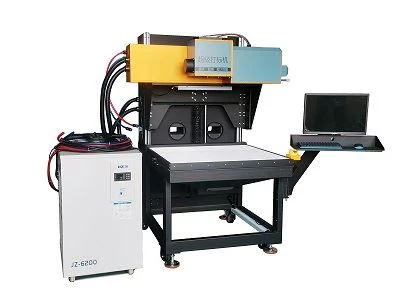
Canvas CO2 Laser Marking
Canvas CO2 laser marking
Products Description
With the Canvas CO2 laser marking machine, users can mark a wide range of materials, including wood, plastic, glass, metal, leather, and ceramics. The machine's laser beam is powerful enough to penetrate these materials, creating high-quality marks that are resistant to fading and wear. Users can also customize their markings with the Canvas CO2 laser marking machine. The machine comes with a user-friendly software interface, which allows users to design and create their own markings. This allows for greater creativity and flexibility when it comes to designing and branding products.
machine features
High-Quality Marks: The CO2 laser engraver create clean and permanent marking on canvas.This makes it ideal for marking or engraving intricate designs, logos, or text on a wide range of materials.
Versatility: Canvas CO2 laser marking can be performed on a variety of materials, including paper, plastic, rubber, wood, glass, and metal.
Fast marking Speed: The laser technology used in Canvas CO2 laser marking is fast and efficient, allowing for quick turnaround times with high levels of accuracy.
Cost-Effective: CO2 engraver requires minimal maintenance and consumables, making it a more affordable option compared to other marking technologies.
Environmentally Friendly: Canvas CO2 laser marking produces minimal waste and does not use any harmful chemicals or solvents. This makes it an environmentally friendly solution for marking and engraving applications.
Safe to operate:Strict multi-protection control design is applicable to a wide range of ambient temperatures ensuring the continuous reliable work of the laser marking system.
Parameter
|
Laser tube parameters |
Max Output Capacity | 250W |
| Nominal Peak Powe | ≥450W | |
| Mode Quality | M2≤1.2 | |
| Duty Cycle Limit | ≤70% | |
| Laser Type | CO2 | |
| Laser Wavelength | 10.6μm | |
|
Marking performance |
Marking Format |
Pattern,Word,Bar code,QRcode,Date,Serial Number |
| Marking Character Types | Pattern and words of vectordiagram & bitmap | |
| Marking Area | 400X400-700X700(mmXmm) Adjustable | |
| Marking Depth | 0-5mm (According to the materials) | |
| Marking Speed | <7000mm/s | |
| Min Line Width | 0.3mm(According to the materials) | |
| Min Character | 0.4mm | |
| Repeat Positioning Accuracy | 0.01mm | |
| Machine information | Total Power | <6KW |
| Power Supply | AC220V/50Hz/30A | |
| Cooling Way | Constant temperature water cooling unit | |
| Working Temperature | 15-30℃ | |
| Working Humidity | <75 No condensation | |
| Working Environment | Without dust, without vibration | |
| Machine Packing Size | 1010*1340*1740mm | |
| Control cabinet packing size | 1060*660*1100mm | |
| Chiller packing size | 660*760*1080mm |
CO2 laser engraving works by emitting a concentrated beam of light that heats the surface of the target material, causing it to melt and vaporize. A CO2 gas mixture excited by an electrical discharge generates a light beam. The process is highly controlled, with the laser beam intensity, speed, and direction carefully calibrated to produce the desired marking.

What are the best setting for laser engraving on canvas?
1. Power Setting
Choosing the appropriate power is the best solution when start engraving canvas. However, the exact power setting required will depend on the canvas's thickness, the fabric's color and composition, and the design. Too little power may not produce the desired results, while too much force may leave burn marks on the canvas. It is advisable to start with a low power setting and gradually increase it until the desired effect is achieved.
2. Speed Setting
The optimal speed setting for laser engraving on canvas should be 100-300 mm/s. However, it is essential to adjust the speed according to the complexity and size of the design. Slower speed may increase processing time but create precise design,fast speed may broken materials.
3. Resolution Setting
Resolution setting refers to the level of detail that can be achieved in the design. Using a resolution setting of at least 300 DPI (dots per inch) for laser engraving on canvas is recommended. A higher resolution can help achieve more intricate designs and sharp lines. However, it is essential to note that higher resolution may also increase engraving time.
4. Other Settings
Other settings that may affect the quality of the engraving include the focal length, ventilation, and alignment. The proper ventilation should be provided to prevent the buildup of smoke and fumes. The alignment of the laser beam should also be checked to ensure that the design is etched in the correct position, don't make disorder wire alignment.
5. Common Mistakes to Avoid
Common mistakes to avoid when laser engraving on canvas include using too much power, having an incorrect focal length, poor ventilation, and using the wrong speed setting. It is also advisable to avoid using canvas with synthetic fibers as they may melt under the laser beam. Additionally, it is essential to have safety precautions in place, such as protective eyewear and gloves, when using high levels of power.
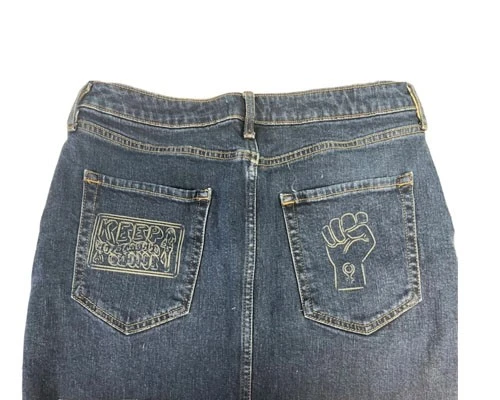
Samples Of Laser Marking Machine



Shipping and package


1. Quality assurance and after-sales service
The warranty period of the equipment shall be 12 months since the equipment be used by the customers, the installation and debugging is completed and the equipment is accepted by the demander. Dotslaser attaches great importance to the after-sales service work of the product, once the product is delivered to the user, the company immediately established the user after-sales service file, and regularly track the user's product use status, solve and answer all the problems of the user, received the user's notification information about the equipment failure, the company's workers can make a rapid response within 2 hours. If the telephone guidance is difficult to troubleshoot, our company's technical staff can arrive at the customer site within 24 hours to provide support.
2. Installation and debugging
Before machine installation, our factory will offer you a basic structure installation file,the good need 2 weeks delivery to you there , the engineers of Dotslaser will arrive at your site and inspect the machine again. Comfirm all the conditions meet the installation and commissioning requirements of the equipment, the equipment will transport in time. The installation and commissioning time of the equipment is about five working days, the first three days are connected to the use of the system, and the system is operational after the service project. The engineer will train qualified operators on basic maintenance procedures and general operating characteristics of the equipment in the next two days
3. Service support
If there has any problem with any part of the system during the warranty period, Dotslaser well-trained service engineers are ready to provide cellphone call or begin on-site service,if the machine has any problem during the warranty period,please contact us directly !
Certificate

FAQ
Q1: How does the package?
Q2: Will the package damaged during transportation?
Q3: How to install and run the machine?
Q4: How can i do if the machine goes wrong?
You Might Also Like


Send Inquiry